Web Based Remote Monitoring
Reliable Web based solutions for monitoring the condition or status of remote assets no matter where you or they are located.
Read more...



Instrument PSUs

Priced to perfection
DIN Rail mounted
All Round Protection
Adjustable 24Vdc o/p


Teleterm RPN1-1 Gateway Ethernet with 2 ports
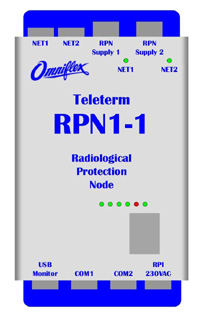
The Radiological Protection Gateway (RPN1-1) gathers data from Ultra Electronics, Mirion AB96, iCAM or G64 monitors & networks the data to supervisory systems via separate Fibre & Power Interfaces to an Ethernet ring network. Two separate serial ports. Winner of the Nuclear Decommissioning Authority SME Innovation Award! Refer to Press Release here.OverviewThe Omniflex Teleterm Radiological Protection Gateway (RPN1-1) simplifies the process of gathering data from Ultra Electronics, Mirion AB96, iCAM or G64 monitors by combining all the required features into a standard, off-the-shelf product. Simply connect Teleterm RPN1-1 nodes together into a fibre optic ring network using standard cabling and link to the Ultra Electronics or Mirion radiation monitors of your choice. Monitor data will be easily readable by the radiological surveillance SCADA system from the RPN1-1 gateway. The RPN1-1 gateway only requires simple configuration through the USB port provided to produce the required functionality. Supports a wide range of Radiation MonitorsThe Teleterm RPN1-1 is supplied with built in support for a wide range of monitors (see the list of supported radiation monitors in the datasheet specifications). If your monitor is not listed, consult with your Omniflex representative for availability. AC Power and Fibre Ring NetworkThe Teleterm RPN1-1 gateway connects into a fibre optic ring network using the “NET1” and “NET2” connectors on the top of the housing. These are standard LC fibre connectors. There are also two separate power connections for a loop-in / loop-out or ring-main arrangement. These connectors are protected against accidental touching of the live conductors on both the cable and RPN connectors. Redundant Ring NetworkNormally the RPN1 gateway is connected in a ring of gateways through the two connectors “NET1” and “NET2”, but these connections are symmetrical, allowing communications to be provided to the Teleterm RPN1-1 through either connector. In the event of a failure in the ring in either direction, the Rapid Spanning Tree Protocol (RSTP) will adjust to operate through only one connection, creating a redundant ring topology. Ring-main power connections will also allow for redundancy in the power supply to the RPN1-1. Embedded Ethernet SwitchAn embedded Ethernet switch in the Teleterm RPN1 provides the following functions:
LED IndicatorsA comprehensive set of LED (Light Emitting Diode) indicators are provided to diagnose communications links. Radiation Monitor ConnectionsThe Teleterm RPN1-1 Gateway is capable of powering and communicating with Ultra, Mirion iCAM or G64 monitors. The -41 version can communicate with monitors from two manufacturers as opposed to one manufacturer in the standard version. Serial Modbus based communications can also be provided on the -41 version. A local MCB on the gateway provides protected power to the monitor through a dedicated power plug on the bottom of the unit. The RPN1-1 Gateway communicates with the radiation monitors through two dedicated RS485 connectors on the bottom of the housing. On the standard RPN1-1, both connectors share a single RS485 link to the gateway. On the -41 version, the two ports are separate allowing monitors from different manufacturers on one unit. It is recommended that a maximum of 16 monitors are connected to each RPN1-1
|
|
|||||||||||||||||||||||||||||||

 Separate power and fibre ring network


